


Macy's: Shopping and Rewards
4.871.68K Reviews
App Specs
- Version
- 2608.3.0
- Updated On
- License
- Free
- Downloads
- 10,000,000+
- Developer
- Macy's Inc
- Categories
- Shopping
- Platform
- Android, iOS
Screenshots







 Analysis by AppCompare
I tend to judge a shopping app by whether it helps me make a better decision, not by how many products it can put on a screen. Macy’s is most useful when I already have a reason to shop there: perhaps I’m looking for clothing, a home item, or a gift and want to compare options without making a separate trip. The app is free to download, so trying it does not require an upfront payment; the cost question that matters is what you choose to buy. That distinction makes it easier to explore without treating every deal as a reason to spend.
A free way into a specific retailer
Macy's: shopping & top deals is a shopping app from Macy’s Inc, rather than a general marketplace that gathers unrelated sellers in one place. That focus is both its clearest strength and its main boundary. If you want to browse Macy’s merchandise, the app offers a convenient place to start; if you want to compare the whole market across many retailers, a broad shopping search may be a better first stop.
The app has been available since November 16, 2011, and its current version is 2605.4.0. It is free, is rated for Everyone, and requires OS 9 or later. Its 4.8 average comes from around 341,000 ratings, alongside about 71,000 written reviews, and it has over 10 million installs. Those figures suggest that it is widely used, but they do not tell me whether a particular item is right for you. For that, the useful work is still checking the product details, price, and fit before you commit.
Shopping Made Simple
With the Macy's: shopping & top deals app, you can browse through a massive inventory without breaking a sweat. Whether you're looking for the latest fashion trends, home essentials, or beauty products, it’s all just a few taps away. The app’s interface is slick and user-friendly, making your shopping experience smooth and enjoyable.
The search function is a lifesaver. You can filter your searches by category, brand, price, and even customer ratings. It’s like having a personal shopper who knows exactly what you want. Plus, the app’s recommendations based on your browsing history are pretty spot on, introducing you to items you might have missed otherwise.
Deals and Discounts Galore
Who doesn’t love scoring a good deal? The app highlights all the ongoing sales and promotions, so you never miss out on savings. There’s a dedicated section for “Deals of the Day” where you can find significant markdowns. It feels like a constant treasure hunt, and the thrill of finding a bargain is just a swipe away.
Another perk is the Macy’s Star Rewards program, which you can easily manage through the app. Accumulate points with every purchase and redeem them for discounts. It’s a fantastic way to save even more while indulging in your shopping cravings.
Worth Reading Before You Choose

Flipboard Shows What News Apps Must Do Beyond the Feed

Switching to Android Auto Means Rethinking Your Driving Routine

Google Calendar Makes a Crowded Week Easier to Manage

Ludo King Makes the Most of the Minutes Between Plans

Baby Panda World Brings Quick Play to Modern Phones, but Its Game Library Feels Busy

ESPN’s Live Game View Makes Following Close Games Easier
Make deal browsing work for you
My practical advice is to decide what you need before opening the deals area. A reduced price is only useful if the item suits your purpose, and a promotion can make browsing feel more urgent than it needs to. I would compare the final price of a specific item with the amount I was prepared to spend, rather than treating a markdown as proof that I am saving overall.
For gifts, I’d search by recipient or occasion in my own notes first, then use the app’s filters to narrow the store’s options. That simple order keeps an attractive promotion from becoming the plan. If I am shopping for a particular size, brand, or budget, I can set those priorities before browsing and use customer ratings as one input—not as a substitute for reading product details carefully.
Never Miss a Beat
Notifications are a double-edged sword, but with this app, they’re more a blessing than a curse. You can customize your alerts to get notifications about flash sales, new arrivals, and special offers. It’s like having a personal assistant who’s always on the lookout for deals specifically tailored to your taste.
There’s also an option to set reminders for items you’re eyeing. If something goes on sale or is about to go out of stock, you’ll be the first to know. It takes the guesswork out of shopping and ensures you never miss a beat.
Keep browsing from taking over
Alerts are most helpful when they match a real shopping plan. I’d choose the notices I actually want and turn off the rest if they start pulling me back into the app without a purpose. For example, someone replacing a winter coat could pay attention to relevant offers, while a person who only needs a birthday gift might prefer to browse when ready rather than receive every new-arrival prompt.
A useful workflow is to save an item for later, then revisit it when you have time to check its details and total cost. That creates a pause between spotting something appealing and buying it. I would not rely on a reminder as a guarantee that a particular item will remain available or at the same price; it is a nudge to look again, not a reason to skip a final check.
Seamless Checkout and Delivery
Once you’ve filled your cart with all the goodies, checking out is a breeze. Macy’s has streamlined the process so you can complete your purchase in just a few steps. You can save multiple shipping addresses and payment methods, making future shopping trips even quicker.
The app also offers various delivery options, including same-day delivery in some areas. So if you’re in a pinch and need a last-minute outfit, Macy’s has got you covered.
Choose convenience without rushing the decision
A realistic use case is getting ready for a family gathering and realizing that you need a small home item as well as a present. I would search for each separately, compare the options, and check the delivery or pickup choice that appears for the order before relying on it. That can save time compared with visiting a store just to see what is available, while still leaving room to reconsider whether the timing and total cost suit the occasion.
Saved addresses and payment methods can make repeat orders quicker, but convenience has a trade-off: fewer pauses can make it easier to check out before reviewing the cart. I recommend taking a moment to confirm sizes, quantities, destination, and the final amount. If a purchase is not time-sensitive, leaving it in the cart while you compare alternatives is a sensible way to avoid buying on impulse.
In-Store Perks
Even if you prefer shopping in-store, the app has features that enhance your experience. You can use it to locate items in a physical store, check stock availability, and even scan price tags for additional information or discounts. It’s like carrying a digital shopping assistant in your pocket.
Plus, if you’re a fan of curbside pickup, the app makes it super simple. Just place your order, select the pickup option, and Macy’s staff will have your items ready when you arrive. No need to scour the aisles—just a quick in-and-out.
When the store visit still makes sense
I would use the app before a store trip to make a shortlist, then treat any availability information as a helpful planning aid rather than a reason to travel without checking the item carefully. For clothing, seeing a product on a screen cannot tell me how the fabric feels or how a cut will fit. If those details are decisive, an in-person visit—or choosing a retailer with a better option for trying things on—may be more useful than placing an order immediately.
Pickup is especially practical when I already know what I want and would rather spend less time searching the aisles. It is less compelling if I enjoy browsing in person or need to compare several items by touch and fit. The app can support either style, but it does not remove the basic choice between the convenience of ordering and the confidence that comes from examining a product yourself.
How it fits beside other shopping apps
Compared with a general marketplace, Macy’s gives me a more focused route into one retailer’s selection and promotions. That can make sense when I want to shop Macy’s specifically or manage a purchase connected to its rewards program. A multi-store comparison app or search engine is more useful when I have a fixed item in mind and want to see what different retailers offer before choosing where to buy.
There is also a difference between browsing in the app and visiting a store. The app is convenient for searching, filtering, and checking offers at home; a physical visit is better when touch, fit, or seeing an item in person will decide the purchase. I would choose based on the question I need answered, not assume that one format is always superior.
Who is likely to get the most from it?
The app makes the most sense for people who already shop at Macy’s, want to browse its fashion or home selection, or appreciate having offers and Star Rewards in the same shopping routine. It can also suit a gift shopper who wants to explore without committing to a store visit straight away. Because access is free, a casual shopper can try it without paying merely to install it, then decide whether the retailer’s selection is relevant to their needs.
I would skip it as a main shopping tool if I rarely buy from Macy’s, prefer to compare many retailers in one place, or need to inspect a product before choosing. It is also not a reason to make an unplanned purchase: the app’s convenience and promotions cannot establish that an item is the best value for you. In those cases, a direct store visit or a broader comparison approach is more likely to answer the important question.
Final Thoughts
Overall, the Macy's: shopping & top deals app is a must-have for anyone who loves shopping but wants to save time and money. Its user-friendly interface, incredible deals, and added conveniences make it a standout in the crowded landscape of shopping apps. So, go ahead and download it—you might just find that perfect piece you didn’t even know you needed.
My recommendation is a little more specific: try it if Macy’s is already a store you want to shop, and use the free access to make browsing or a planned purchase easier. I would judge its value by whether it helps me find the right item and complete the errand with less hassle—not by how many deals I can scroll through. For shoppers who want a single retailer’s catalog and in-store convenience in one place, it is a useful option; for those who need broad price comparisons or hands-on inspection first, another route may suit them better.
Pros
- User-friendly interface with seamless navigation.
- Wide range of products available for all needs.
- Exclusive deals and discounts for app users.
- Easy checkout process with multiple payment options.
- Efficient customer service with quick response times.
Cons
- Occasional glitches during peak shopping times.
- Notifications can be overly frequent and intrusive.
- Limited international shipping options available.
- Some product details lacking in-depth information.
- App updates can be large
- requiring significant space.
FAQs for Macy's: Shopping and Rewards
What features does the Macy's app offer for a better shopping experience?
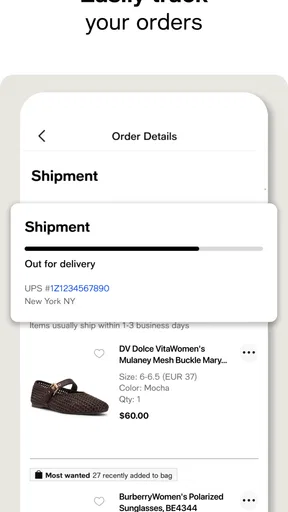
The Macy's app provides a seamless shopping experience with features like barcode scanning for price checks, personalized recommendations, and access to exclusive deals and promotions. Users can also manage their Macy's credit card, track orders, and receive notifications about sales and new arrivals, enhancing the overall shopping journey.
How does the Macy's app handle security and user privacy?
Macy's prioritizes user security and privacy by implementing advanced encryption and secure login protocols. The app requires user authentication for credit card management and personal information. Additionally, it complies with privacy regulations to ensure user data is protected and not shared without consent, providing a safe shopping environment.
Can I use the Macy's app to make returns and track my orders?
Yes, the Macy's app allows users to easily initiate returns and track their orders. The order tracking feature provides real-time updates on shipping status, while the returns process is streamlined, allowing users to manage returns directly through the app, making it convenient and hassle-free.
Is the Macy's app available for both Android and iOS devices?
The Macy's app is available for both Android and iOS platforms. Users can download it from the Google Play Store or Apple App Store. It is optimized for various devices, ensuring a smooth and responsive user experience regardless of your smartphone or tablet's operating system.
What are the benefits of using the Macy's app compared to shopping online via a web browser?
The Macy's app offers several advantages over browser shopping, including faster load times, personalized notifications, and app-exclusive deals. The app provides a more tailored experience with features like in-store mode and barcode scanning, which are not available on the website, enhancing the overall shopping experience.


